
Nomad Media Guest User Deployment Guide
This guide will help administrators setup guest user access for remote users.
1. Add new Security Group for Guests
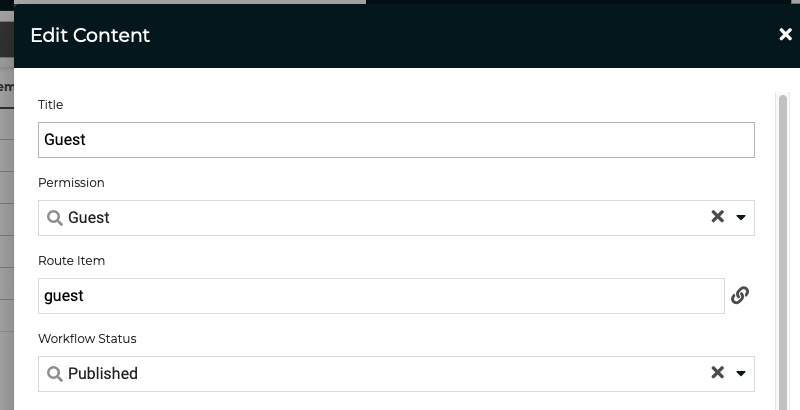
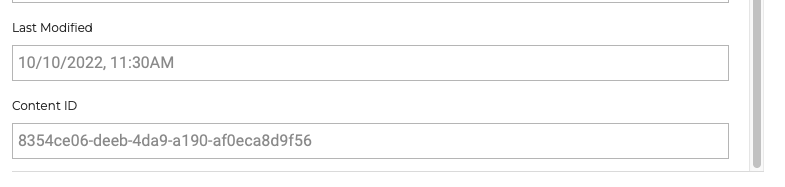
After creating the new security group, please grab the Content Id (see below) as this will be needed later in the API configuration setups.
2. Update Live Virtual Experience Portal configuration
Live Virtual Experience Portal Application = "a3be3566-a27f-4bae-a9c2-f9e067d66367";
Live Control Application = "5de59d64-d87f-46f0-8b6c-273aaa6cd2d4";
Content Portal Application = "fb398b44-427d-4e7b-bfe7-f9b873f28e12";
Admin Application = "744781f0-f5e4-43ba-9a49-0b5d8dfd86be";
Add application id (see above) to vep.json at root level. In this example we added Live Virtual Experience Portal Application Id
"applicationId": "a3be3566-a27f-4bae-a9c2-f9e067d66367",Now add the required VEP module inside the vepModules config
{
  "order": 30,
  "moduleType": "addTempUser",
  "isEnabled": true,
  "title": "Participants",
  "iconUrl": "icons/user-plus-icon.svg",
  "iconHoverUrl": "icons/user-plus-icon-hover.svg",
  "isDefault": false
}
3. Customizing the invite email template
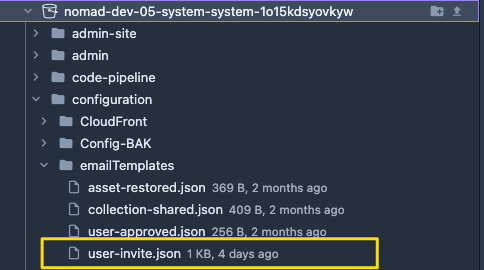
There is a new email template that you may customized, located at configuration/emailTemplates folder. See example below here.
4. Update API config
Add these configuration settings into the API configuration file.
This first one is to kick users out if we detect a user session has been reused by a different IP.
"application/nomadSettings": {
    "enablePing": true,
}
This next set of configuration will turn on Guest User Access at the API level.
Take note of the following config you will need to confirm and update
- If 8 hours is valid for default expiration, then you can take that out, as we default to 8 hours internally.
- Make sure you match your email template name (see above)
- Make sure you fill in your customer's registration url
- Make sure you confirm which application guest user will be used for
- Make sure you confirm your new security group id (see above)
- Make sure you confirm what content definition you want to share
"application/userShareSettings": {
  "userShareProfiles": [
    {
      // The name of the user share profile (i.e. Guest)
      "name": "Nomad Guest",

      // Content Security Attribute for profile (i.e. Guest, Demo, External)
      // Guest is only supported at this time
      "contentSecurityAttribute": "Guest",

      // The number of hours the user will have to access shared content
      // This is optional, defaults to 8 hours
      "defaultExpirationInHours": 8,

      // Name of the email template to use.
      // This name must be configured in emailSettings/Templates
      "defaultEmailTemplate": "userInvite",

      // Full url to the application's register route
      "defaultSiteRegistrationUrl": "https://live.dev-05.demos.media/account/register",

      // The allowed applications this share profile can log into
      "allowedApplications": ["a3be3566-a27f-4bae-a9c2-f9e067d66367"],

      //  The guid id of the security group that correlates to the ContentSecurityAttribute
      "securityGroup": {
        // Matches the contentSecurityAttribute config
        "description": "Guest",

        // Guid from the new Guest Security Group that was created
        "id": "8354ce06-deeb-4da9-a190-af0eca8d9f56"
      },

      // List of User Share Profile Definitions (i.e. LiveChannels, AssetGroups)
      "userShareProfileDefinitions": [
        {
          // Name of the content definition
          "name": "Live Channels",

          // Guid of the content definition id
          "contentDefinitionId": "bf8ac754-5b8b-4330-b1aa-76f15fb7f673",

          // Optional Expiration in hours, if you want to override default
          "expirationInHours": 8,

          // Optional Email template for invitation, if you want to override default
          "emailTemplate": "userInvite",

          // Optional Site Registration Url for invitation, if you want to override default
          "siteRegistrationUrl": "https://live.dev-05.demos.media/account/register"
        }
      ]
    }
  ]
},
FAQ
Ping Configuration is meant to be user temporarily, eventually it will be turned on by default. It's here for now to turn off if we hit issues
If Guest User is experiencing issues, we need to take this entire config section out to disable it.
Updated 7 months ago