
MobiusLabs Configuration
Scope of this page: this guide covers Mobius Labs setup only. For capability planning and staged AI rollout guidance, see AI Enablement Guide and Phased AI Rollout.
There are three main sections and several sub-sections in your system configuration file which can be found in your sytem bucket /configuration/{environment}.json that can be modified to suit your needs regarding the MobiusLabs Artificial Intelligence server(s).
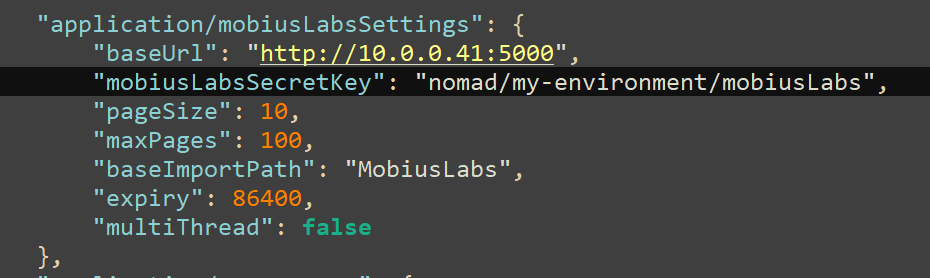
- application/mobiusLabsSettings
- baseUrl
- This partial Uri / Url value is the base url to your MobiusLabs SDK server and should be used for all calls to process any MobiusLabs job / task.
- mobiusLabsSecretKey
- This field can be used to store secrets that can be pulled into your system at run-time that you must keep secret such as privacy, legal, governmental, hippa or any other reason that you require.
- pageSize
- This field is reserved for future use.
- maxPages
- This field is reserved for future use.
- baseImportPath
- This field is reserved for future use.
- expiry
- This field tells the system how long an asset is valid for from AWS S3.
- Since your Nomad Media system runs on a server that is "remote" to your MobiusLabs SDK server(s) we must use an AWS pre-signed url so that the SDK server can have authorization to read the asset in question.
- multiThread
- This field is reserved for future use.
-
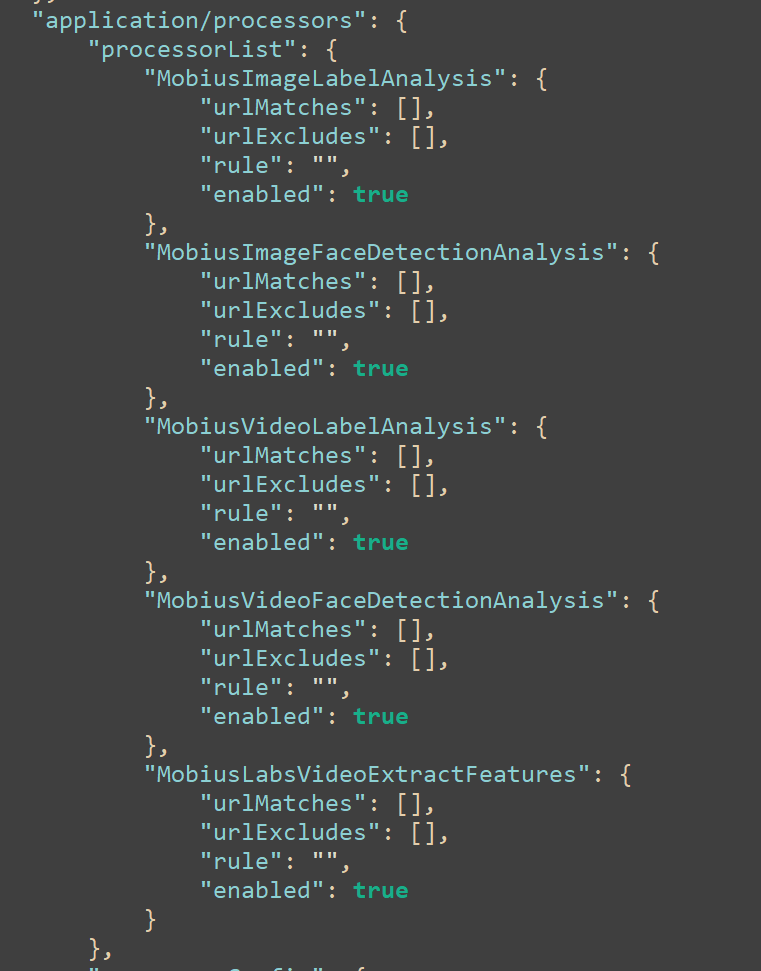
application/processors
- processorList
- MobiusImageLabelAnalysis
- MobiusImageFaceDetectionAnalysis
- MobiusVideoLabelAnalysis
- MobiusVideoFaceDetectionAnalysis
- MobiusLabsVideoExtractFeatures
- For the above configuration options in the processorList the below holds true for all:
- UrlMatches
- Matches one or more folders and its sub-folders to limit the amount of processing that MobiusLabs will run, a trailing / is not required.
- default value is an empty array
- UrlExcludes
- Excludes one or more folders and its sub-folders from being included in any MobiusLabs process.
- default value is an empty array
- Excludes one or more folders and its sub-folders from being included in any MobiusLabs process.
- Enabled
- This field allows you to toggle the particular processor on or off.
- default value is false
- This field allows you to toggle the particular processor on or off.
- Rule
- This field is reserved for future use.
- UrlMatches
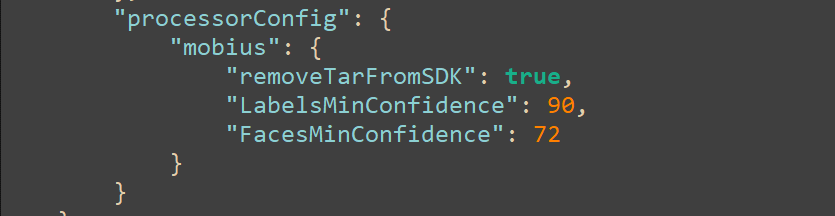
- processorConfig
- Mobius
- RemoveTarFromSDK
- This field tells MobiusLabs to either retain or delete the tar file from the server after a job has finished. It is advised to leave this enabled to save space on the SDK servers disk.
- default value is true
- LabelsMinConfidence
- This field tells MobiusLabs what the minimum confidence must be to include it in the output.
- default value is 90 and is a percentage value
- valid values are 0 - 100
- the recommended range is 70 - 90 depending on your needs
- FacesMinConfidence
- This field tells MobiusLabs what the minimum confidence must be to include it in the output
- default value is 72
- valid values are 0 - 100
- the recommended range is 70 - 90
- RemoveTarFromSDK
- Mobius
- processorList
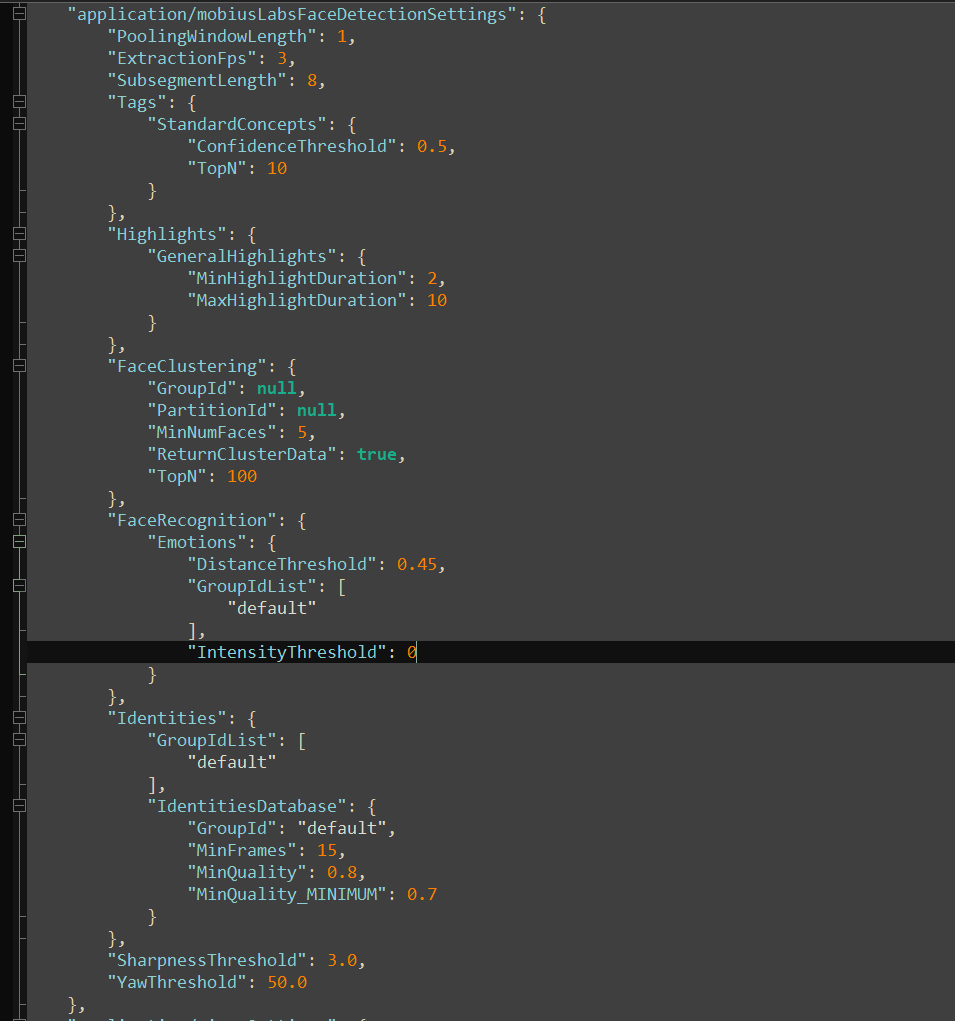
application/mobiusLabsFaceDetectionSettings
- PoolingWindowLength
- default value is 1
- defines the number of frames over which smoothing of the predictions will be applied.
- ExtractionFps
- default value is 3
- specifies the number of frames per second (FPS) extracted from the video for processing. Default value is 3. Higher rate will take longer for processing, but will analyse finer transitions in the video giving more information. If set to -1, every single original frame will be analyzed. This is very resource intensive and can result in large prediction outputs, so only use this if really necessary.
- SubsegmentLength
- default value is 8
- defines the length of each subsegment as the number of frames in regards to the extraction_fps framerate. If the extraction_fps is set to 10 and the subsegment_length is 20, then each subsegment is 2 seconds long (20 frames / 10 fps = 2s). This length should be shorter than the expected length of a shot, but still larger than 1 to allow the 'pooling' / smoothing of prediction results over multiple extracted frames.
- Tags
- StandardConcepts
- ConfidenceThreshold
- default value is 0.55
- The threshold on the confidence of concept predictions
- TopN
- default value is 10
- Return the highest scored N concepts
- ConfidenceThreshold
- StandardConcepts
- FaceClustering
- GroupId
- default value is null
- PartitionId
- default value is null
- MinNumFaces
- default value is 5
- ReturnClusterData
- default value is true
- TopN
- default value is 100
- GroupId
- FaceRecognition
- Emotions
- DistanceThreshold
- default value is 0.45
- GroupIdList
- default value is ["default"]
- group_id_list is the list of groups to which the emotion belongs in the facial expression database.
- IntensityThreshold
- default value is 0
- DistanceThreshold
- Identities
- GroupIdList
- default value is ["default"]
- Groups to use for face identification.
- IdentitiesDatabase
- GroupId
- default value is "default"
- Group Id to save new identities into.
- MinFrames
- default value is 15
- Minimum number of frames which unknown identity is spotted in
- MinQuality
- default value is 0.8
- valid range: 0 - 1
- see MinQuality_MINIMUM
- The threshold on the face quality
- MinQuality_MINIMUM
- default value is 0.7
- GroupId
- GroupIdList
- SharpnessThreshold
- default value is 3.0
- Images above the threshold can be considered sharp.
- YawThreshold
- default value is 50.0
- The YawThreshold is used to detect if a face is sideways (|yaw| > the threshold).
- Emotions
application/mobiusLabsSettings JSON example screenshot:
application/processorsJSON example screenshot
processorConfig example JSON screenshot
application/mobiusLabsFaceDetectionSettings
Additional documentation may be found at https://docs.mobius.ml/on_premise/3.0.4/1qiPA/
Updated 5 months ago
Did this page help you?