
Custom Asset Processors
Guide for building a custom Lambda processor for Nomad Media — Lambda types, data structures, Redis state management, and deployment.
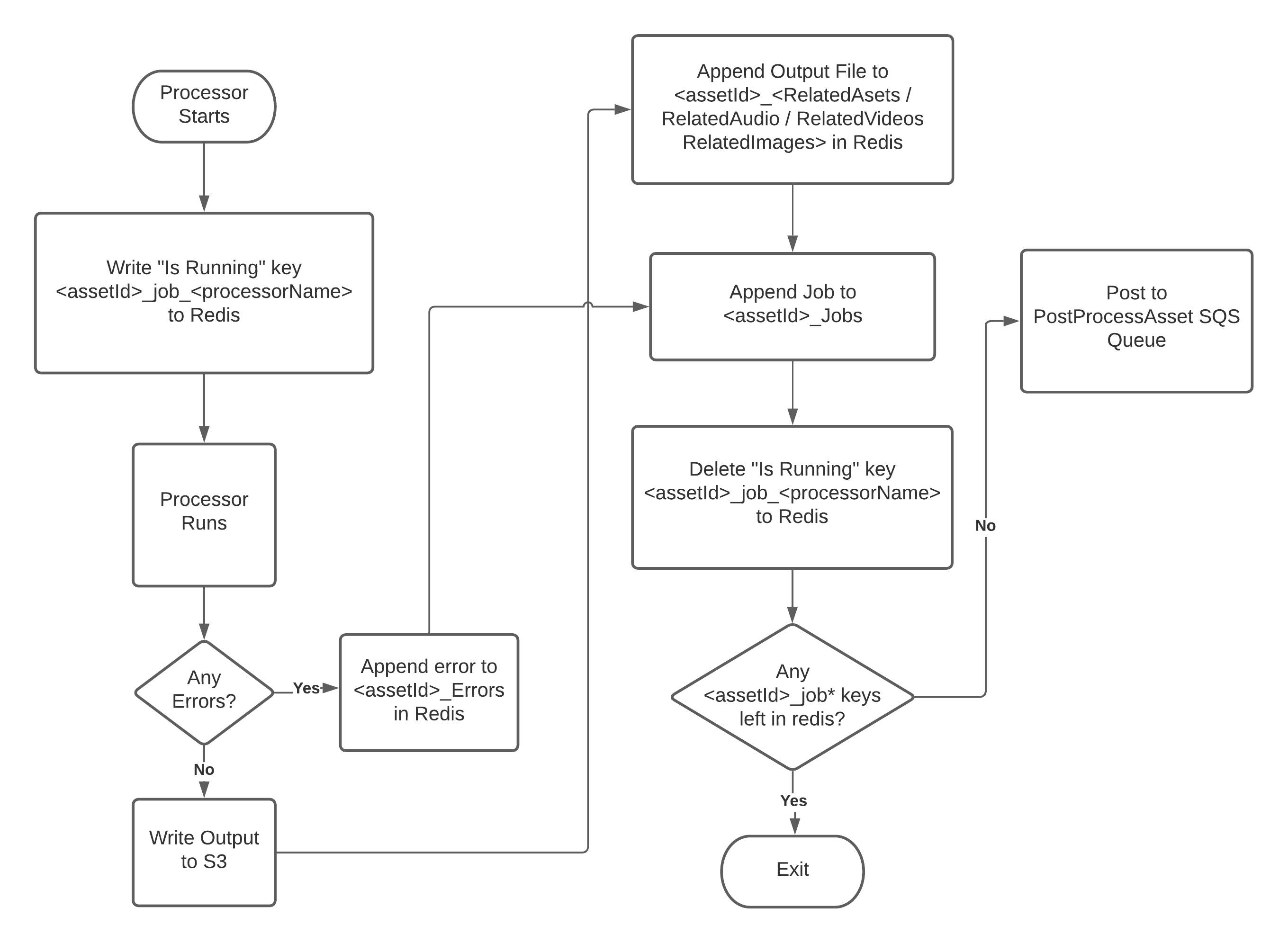
Nomad Media supports custom background processors implemented as AWS Lambda functions. When an asset is uploaded to a configured S3 bucket, the pipeline automatically triggers. Custom processors integrate into this pipeline by following the standard patterns for input handling, state management via Redis, related asset registration, and manifest finalization.
Background
The processing pipeline uses background Lambdas that call AWS services (Rekognition, Transcribe, Textract, etc.) and write results to a manifest file (JSON). A custom processor follows the same conventions to ensure its output is available alongside built-in processor output.
Audience
This guide is for developers writing new Lambda processors for server-side asset processing. It covers how to create a Lambda, integrate it with the Nomad Media pipeline, and ensure that the resulting metadata is available in the asset manifest.
Lambda Types
There are four Lambda patterns used in the pipeline:
-
Standard / Synchronous Lambda — Handles an SQS event. Starts a job, completes it, and exits. Input follows
aws.SQSMessageformat with a body matching theLambdaInputstruct. -
Batch Generation Lambda — Used for processing that cannot be handled in a single Lambda invocation. Receives SQS input, creates multiple batches, and fires them into a Batch Handling Lambda.
-
Batch Handling Lambda — Receives batches from a Batch Generation Lambda. Input format is specific to the Lambda. May hand off to external services (e.g., Rekognition) and then exit. If it calls another Lambda, it must supply
LambdaInputas input. -
Pass-through Asynchronous Lambda — Handles events from sources other than SQS (CloudWatch Events, S3 Events, SNS). If it calls an SQS-consuming Lambda downstream, it must supply
LambdaInput.
LambdaInput Structure
The standard input struct passed between Lambdas:
type LambdaInput struct {
    AssetID             string   `json:"assetId,omitempty"`
    BucketName          string   `json:"bucketName,omitempty"`
    ObjectKey           string   `json:"objectKey,omitempty"`
    CompleteSQSTriggers []string `json:"completedSqsTriggers,omitempty"`
    SourceAssetID       string   `json:"sourceAssetId,omitempty"`
    TriggeredBy         string   `json:"triggeredBy,omitempty"`
    // Rekognition-specific
    SegmentID           string   `json:"segmentID,omitempty"`
    SegmentOrder        int64    `json:"segmentOrder,omitempty"`
    RekognitionJobType  string   `json:"jobType,omitempty"`
    RequestID           string   `json:"requestId,omitempty"`
}
At minimum, assetId and triggeredBy must be populated.
Naming Conventions
Output file names follow the pattern <processortype>.<extension> (e.g., rekognitionimagedetecttext.json).
Files are stored under:
- Metadata content bucket — for data accessed by the UI
- Metadata archive bucket — for internal processing data not accessed by the UI
Both buckets use the same path structure:
<bucket>/<first-2>/<next-2>/<next-2>/<full-assetId>/<filename>Example:
metadata-content/4d/5b/02/4d5b02b2-b829-47c8-b8a3-eb5f68af4bd7/manifest_asset.jsonBucket names are configured in system/metadataBucketSettings.
Error Handling and Logging
Redis is used as the centralized state hub during processing. The Redis connection config is read from AWS Secrets Manager at <projectPrefix>/redis:
{ "Host": "<host>", "Port": "<port>" }Logging format:
{
  "Level": "INFO",
  "Date": "2020-11-17T14:59:25.794Z",
  "LogSource": "",
  "Message": "",
  "RequestID": "",
  "LogName": "",
  "InstanceID": "",
  "Properties": {}
}
WARN and ERROR levels additionally include:
"error": """errorVerbose": ""
Error handling rules:
- Lambdas should never return an error — log it instead.
- Lambdas should always dequeue the SQS message that spawned them, unless the error is an AWS throttling error.
Registering a Running Job in Redis
When your Lambda starts, write a key to Redis to register it as running:
<assetId>_job_<processorName>Example: 6c495d10-2c72-4961-9edc-746f2b35bc75_job_RekognitionDetectLabels
When your Lambda finishes (success or error), delete this key.
Related Assets
Any files generated by your processor must be registered as related assets in Redis before the manifest is finalized. The Redis key depends on file type:
| File Type | Redis Key |
|---|---|
| Audio | <assetId>_RelatedAudio |
| Video | <assetId>_RelatedVideos |
| Image | <assetId>_RelatedImages |
| Anything else | <assetId>_RelatedAssets |
If the key already exists, append to the array. Otherwise, create a new array with a single entry.
RelatedAsset struct:
type RelatedAsset struct {
    ID                  string    `json:"id,assetId,AssetID,omitempty"`
    JobID               string    `json:"jobID"`
    URL                 string    `json:"url,omitempty"`
    LanguageCode        string    `json:"languageCode,omitempty"`
    MetadataTypeDisplay string    `json:"metadataTypeDisplay,omitempty"`
    MetadataType        int       `json:"metadataType,omitempty"`
    Language            *Language `json:"language,omitempty"`
    Title               string    `json:"title,omitempty"`
}

type Language struct {
    ID             string `json:"id"`
    Description    string `json:"title"`
    LanguageName   string `json:"translatedTitle"`
    FiveLetterCode string `json:"iso5"`
    TwoLetterCode  string `json:"iso2"`
}- URL:
<bucketName>::<objectKey> - MetadataType: numeric ID of the metadata type
- MetadataTypeDisplay: written name of the metadata type
- Title:
MetadataTypeDisplaysplit by word boundaries and title-cased (e.g.,RekognitionImageDetectText→Rekognition Image Detect Text) - Language: populate only when relevant (e.g., transcripts, subtitles)
- JobID: the job ID that ran the processor
Jobs
Each processor run must also be registered in Redis as a job. Append to <assetId>_Jobs (or create the array if it does not exist):
type Job struct {
    ID          string    `json:"id,omitempty"`
    Duration    string    `json:"duration,omitempty"`
    StartTime   time.Time `json:"startTime,omitempty"`
    EndTime     time.Time `json:"EndTime,omitempty"`
    ItemCount   int       `json:"itemCount,omitempty"`
    Name        string    `json:"name,omitempty"`
    Status      string    `json:"status,omitempty"`
    Description string    `json:"description,omitempty"`
    TriggeredBy string    `json:"triggeredBy,omitempty"`
}- Duration: seconds
- StartTime / EndTime: set at Lambda start and finish
- Name: descriptive Lambda name (e.g.,
Rekognition, notdemo3-process-rekognition) - Status:
Started,Error, orCompleted - TriggeredBy: the Lambda that triggered this job
PostProcessAsset — Finalizing the Manifest
When your Lambda finishes, check Redis for remaining jobs:
MGET <assetId>_job*- If any jobs remain → exit. Another processor will handle finalization.
- If no jobs remain → your processor is the last one. Post a message to the SQS URL at
system/SQSQueueSettings -> postProcessAssetQueueUrl:
{
  "assetId": "<the asset id being processed>",
  "triggeredBy": "<the name of your lambda>"
}
This triggers the PostProcessAsset Lambda, which assembles and registers the final manifest.
Environment Variables
| Variable | Required | Description |
|---|---|---|
ProjectPrefix | Yes | Unique string identifying the environment |
configS3BucketPath | Yes | <bucketName>/<objectKey> — path to the environment config file in S3 |
AdminServiceUrl | If using .NET APIs | URL for Nomad Media Admin API |
ApiUrl | If using .NET APIs | URL for Nomad Media Portal API |
KeepRedisAsset | Testing only | Set to any value to prevent Redis cleanup after processing. Never use in production. |
Adding Your Processor to the System
A new processor requires a JobType to be added to the Processors and JobService.JobType struct. This is currently a manual step performed by the Nomad Media team. Contact your team liaison to register the new processor type before deployment.
To enable the processor on assets, add it to the processorList in the application/processors config section. See Turning On/Off Asset Processors for details.
Updated 7 months ago