
JWPlayer Configuration and SetUp
This JSON file is used to connect the Nomad Media system to your JWPlayer system
{
    "PropertyId":"{propertyId}",
    "ClientId":"{clientId}",
    "ClientSecret":"{secret}"
}| Field Name | Comments |
|---|---|
| PropertyId | The site ID is a unique identifier for an account property (sometimes called Property ID). Find it on the Properties page under the Property Name column. |
| ClientId | The API Key Name. See Figure #1 below. |
| ClientSecret | The API Key Secret. See Figure #2 below. |
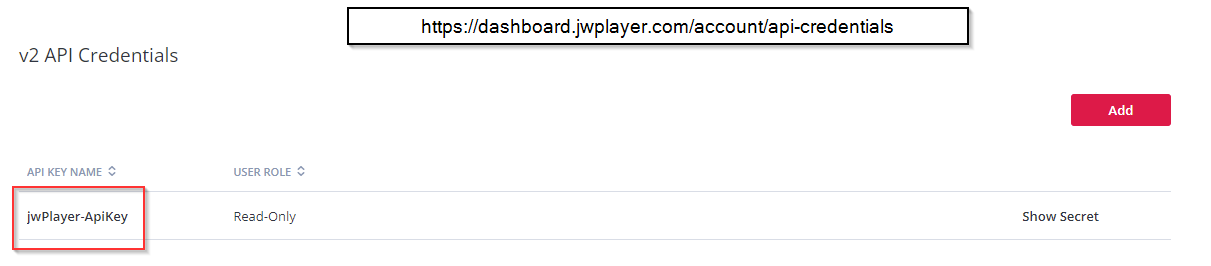
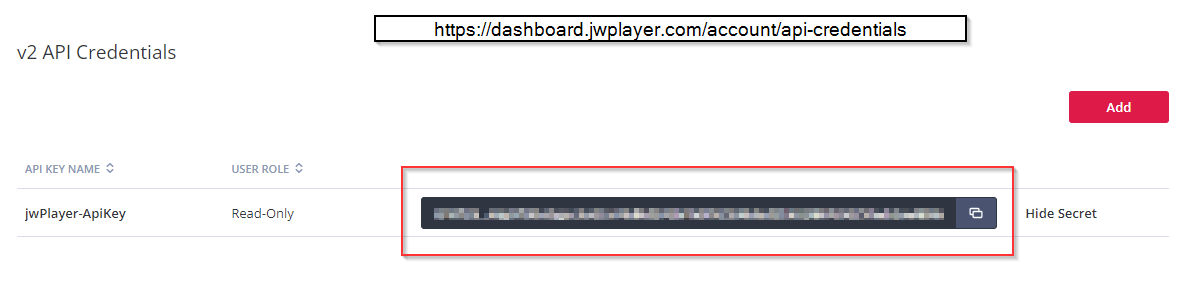
JWPlayer Authentication Documentation
https://developer.jwplayer.com/jwplayer/reference/api-v2-authentication
JWPlayer API Credentials Page
https://dashboard.jwplayer.com/#/account/apicredentials
This JSON file is located as a root node in your system configuration file: e.g. demo3.json
{
	"BaseUrl": "https://api.jwplayer.com/v2/",
	"JWPlayerSecretKey": "nomad/projectId/jwplayerSecret",
	"PageSize": 10,
	"MaxPages": 100,
	"BaseImportPath": "JWPlayer",
	"MultiThread": false
}| Field Name | Comments |
|---|---|
| BaseUrl | The base url for the JWPlayer API |
| JWPlayerSecret | The path and name of the secret in AWS which points to the above file containing the clientid, clientsecret, and propertyid |
| PageSize | How many items to return per page in regards to the JWPlayer API. |
| MaxPages | The maximum amount of pages to read through in regards to the JWPlayer API. |
| BaseImportPath | The root folder that will be created in your Nomad Media installation. |
| MultiThread | If in production this value should be true |
NotesImporting of playlists is not supported at this time.
Importing of externally hosted content is not supported at this time.JWPlayer Categories become your folder structure in Nomad Media
Updated 7 months ago
Did this page help you?