
Ad Server Integration
How to integrate AWS MediaTailor with Nomad Media for AI-driven ad break generation and VMAP delivery.
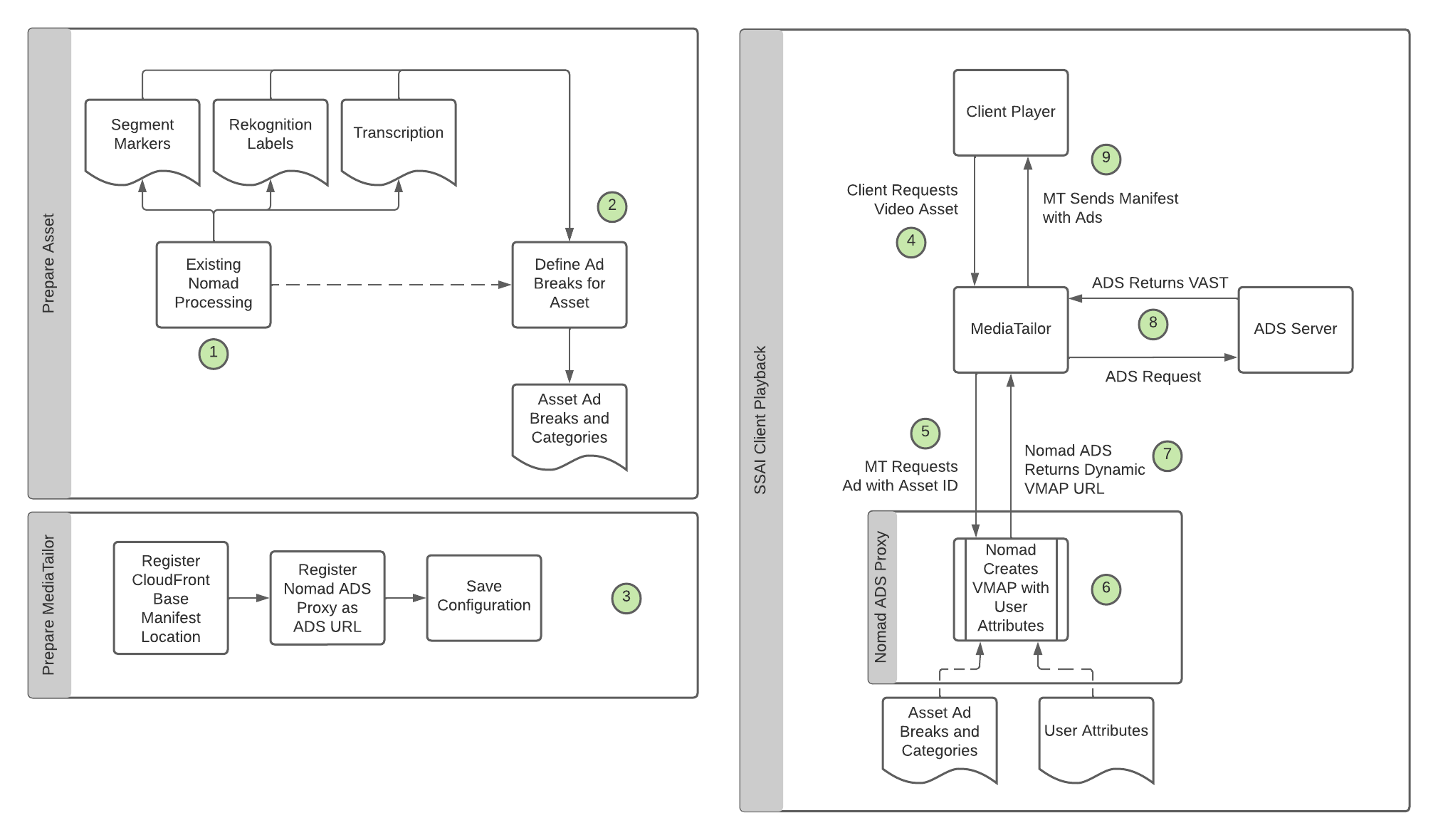
Step 2 — Generate Ad Breaks for Asset
Overview
| Input | AssetID |
| Output | Ad Breaks JSON file |
| Technology | Nomad Media Video Service |
Resources used:
- Rekognition Segment Detect Shots
- Rekognition Labels
- Transcription (Words)
- IAB Categories
- Categorization Mapping
- Ad Break Counts
Process:
- Using the video length, look up the required number of ad breaks from the Ad Break Counts table.
- Find the best segment markers, as evenly spaced as possible, based on the ad break count using Rekognition Segment Detect Shots.
- Using the created segments, map labels and transcription words into IAB Categories using the Categorization Mapping for each segment.
- Determine the top 2 IAB Categories for each segment.
- Create an Ad Breaks JSON file for the asset containing timecodes and the 2 best IAB codes for each ad break.
- Upload the Ad Breaks file to S3 and associate it to the asset.
Step 3 — Prepare MediaTailor
Overview
| Input | None |
| Output | MediaTailor configuration |
| Technology | Nomad Media Ad Service |
Resources used:
- CloudFront URLs for Nomad Media
- S3 URLs for Nomad Media
Process:
Using the configuration options already known by Nomad Media, register the required MediaTailor configurations.
Steps 6/7 — Create VMAP with Categories and User Data
Overview
| Input | AssetID, UserID |
| Output | VMAP file |
| Technology | Nomad Media Ad Service |
Resources used:
- Ad Breaks file for Asset
- User attributes (IAB codes)
Process:
- Using the AssetID, retrieve the existing Ad Breaks file generated in Step 2.
- Using the UserID, retrieve the IAB codes associated to that user.
- Create the VMAP file with the direct ADS URL including the IAB codes for the user and the ad break timecodes in the query string.
- Return the updated VMAP file.
Updated 7 months ago
Did this page help you?